> For the complete documentation index, see [llms.txt](https://docs.ruuvi.com/llms.txt). Markdown versions of documentation pages are available by appending `.md` to page URLs; this page is available as [Markdown](https://docs.ruuvi.com/ruuvi-gateway-firmware/examples/mqtt-examples.md).
# MQTT examples
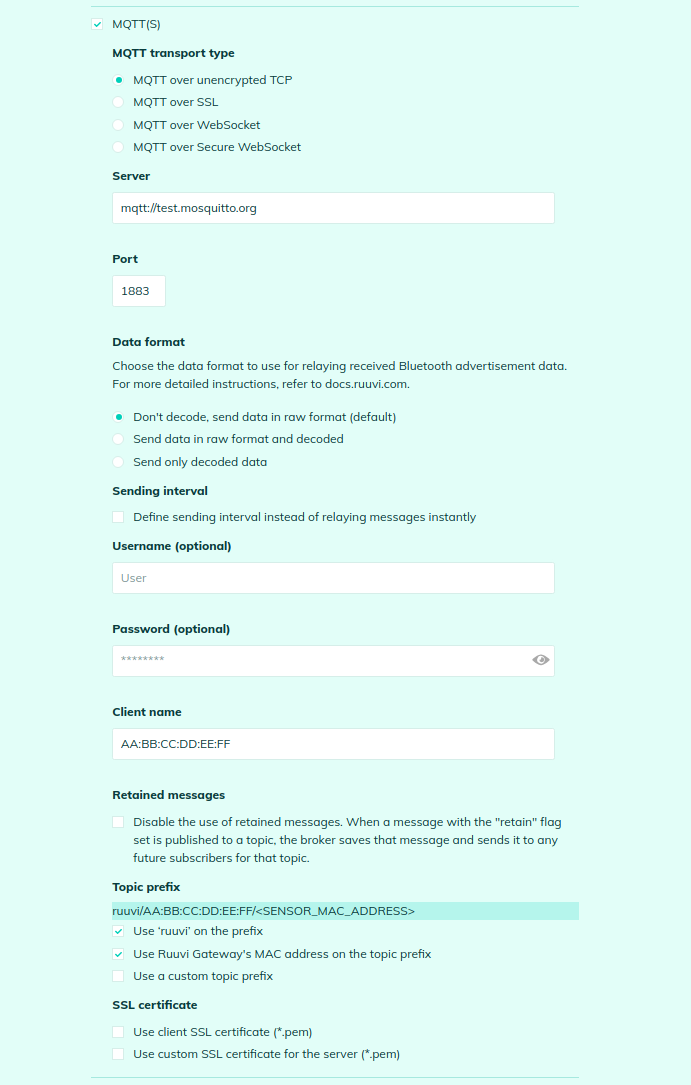
Here is an example of MQTT configuration on the Ruuvi Gateway:
Here are sample commands to subscribe an MQTT client to notifications from the Ruuvi Gateway:
* Subscribe to service messages from this Gateway:\
`mosquitto_sub -h test.mosquitto.org -p 1883 -t "ruuvi/AA:BB:CC:DD:EE:FF/gw_status" -v`
* Subscribe to service messages from any Gateway:\
`mosquitto_sub -h test.mosquitto.org -p 1883 -t "ruuvi/#/gw_status" -v`
* Subscribe to messages from a Bluetooth sensor with the MAC:\
`mosquitto_sub -h test.mosquitto.org -p 1883 -t "ruuvi/#//#" -v`
* Subscribe to messages from any Bluetooth sensor that this Gateway receives:\
`mosquitto_sub -h test.mosquitto.org -p 1883 -t "ruuvi/AA:BB:CC:DD:EE:FF/#/#" -v`
* Subscribe to all messages:\
`mosquitto_sub -h test.mosquitto.org -p 1883 -t "ruuvi/#" -v`\\