> For the complete documentation index, see [llms.txt](https://docs.ruuvi.com/llms.txt). Markdown versions of documentation pages are available by appending `.md` to page URLs; this page is available as [Markdown](https://docs.ruuvi.com/ruuvi-gateway-firmware/examples/configuration-update-via-api.md).
# Configuration update via API
If your Gateway is password protected, you can configure the Gateway to allow you to update the configuration on it programmatically using bearer authentication.
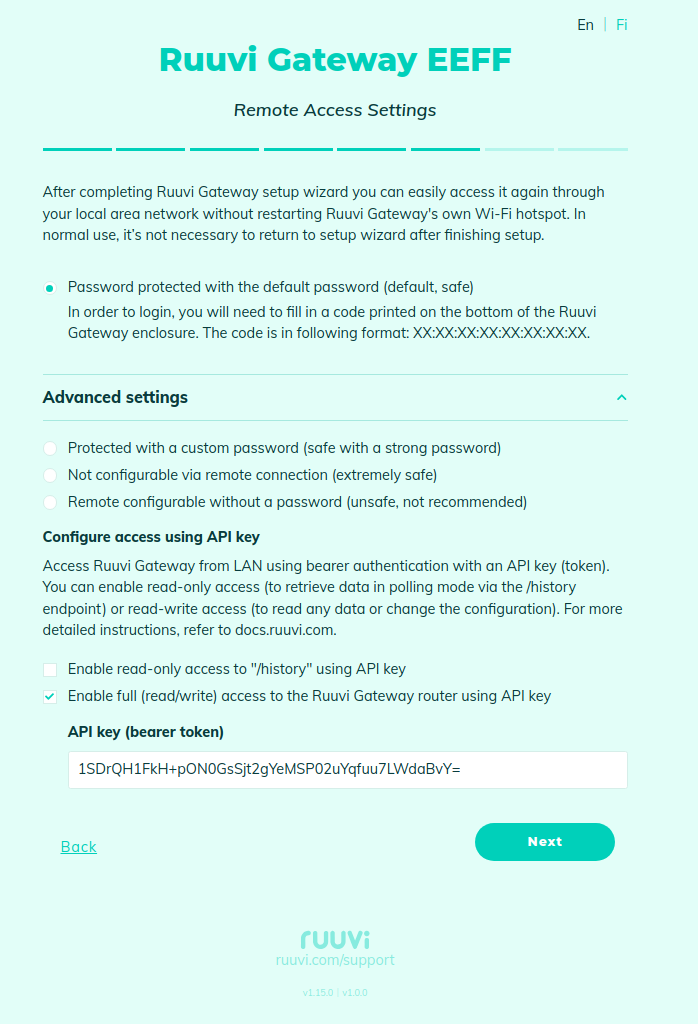
On the "Access Settings" page, enable full access using bearer authentication and set the API-key:
If your Gateway is password protected and bearer authentication is not configured, you can still access the Gateway by using the 'RUUVISESSION' cookie from your browser. Open the configuration wizard in your browser and authenticate with the password, then open 'Developer Tools' in your browser, then open URL 'http\://\/ruuvi.json'. In 'Developer Tools', open the 'Network' tab, select the 'Headers' sub-tab and locate the "RUUVISESSION" cookie:\

Please note that you can only access the Gateway using the cookie from the same PC as the browser used for authentication.
### Examples
#### Getting configuration from the Gateway
In the following examples, the gateway configuration is stored in the 'ruuvi.json' file.
* The Gateway is remotely configurable without a password:
```bash
curl -v http:///ruuvi.json --output ruuvi.json
```
* The Gateway is remotely configurable using a bearer token:
```bash
curl -v http:///ruuvi.json
-H "Authorization: Bearer 1SDrQH1FkH+pON0GsSjt2gYeMSP02uYqfuu7LWdaBvY="
--output ruuvi.json
```
* Using a cookie from the browser to access the Gateway:
```bash
curl -v http:///ruuvi.json
--cookie "RUUVISESSION=SEUFTNJMCZASBWUO"
--output ruuvi.json
```
#### Uploading configuration to the Gateway
To upload the configuration from the "./ruuvi.json" file:
* The Gateway is remotely configurable without a password:
```bash
curl -v http:///ruuvi.json
-H "Content-Type: application/json"
-d @./ruuvi.json
```
* The Gateway is remotely configurable using a bearer token:
```bash
curl -v http:///ruuvi.json
-H "Content-Type: application/json"
-H "Authorization: Bearer 1SDrQH1FkH+pON0GsSjt2gYeMSP02uYqfuu7LWdaBvY="
-d @./ruuvi.json
```
* Using a cookie from the browser to access the Gateway:
```bash
curl -v http:///ruuvi.json
-H "Content-Type: application/json"
--cookie "RUUVISESSION=SEUFTNJMCZASBWUO"
-d @./ruuvi.json
```
#### Disabling all data relay interfaces
These examples show how to disable relaying data to the Ruuvi cloud, custom HTTP(S) server and MQTT.
* The Gateway is remotely configurable without a password:
```bash
curl -v -X POST http://ruuvigateway9c2c.local/ruuvi.json
-H "Content-Type: application/json"
-d '{"use_http_ruuvi":false, "use_http":false, "use_mqtt":false}'
```
* The Gateway is remotely configurable using a bearer token:
```bash
curl -v -X POST http://ruuvigateway9c2c.local/ruuvi.json
-H "Content-Type: application/json"
-H "Authorization: Bearer 1SDrQH1FkH+pON0GsSjt2gYeMSP02uYqfuu7LWdaBvY="
-d '{"use_http_ruuvi":false, "use_http":false, "use_mqtt":false}'
```
* Using a cookie from the browser to access the Gateway:
```bash
curl -v -X POST http://ruuvigateway9c2c.local/ruuvi.json
-H "Content-Type: application/json"
--cookie "RUUVISESSION=SEUFTNJMCZASBWUO"
-d '{"use_http_ruuvi":false, "use_http":false, "use_mqtt":false}'
```
#### Uploading network configuration
**Note**: The network settings must be uploaded separately from the main Gateway configuration.
Example of "ruuvi.json" with the network settings (See [Gateway configuration](/ruuvi-gateway-firmware/data-formats/gateway-configuration.md)):
```json
{
"wifi_sta_config": {
"ssid": "",
"password": ""
},
"wifi_ap_config": {
"password": "",
"channel": 1
},
"use_eth": true,
"eth_dhcp": true,
"eth_static_ip": "",
"eth_netmask": "",
"eth_gw": "",
"eth_dns1": "",
"eth_dns2": ""
}
```
The network configuration must contain the **use\_eth** key and the main Gateway configuration must not.