> For the complete documentation index, see [llms.txt](https://docs.ruuvi.com/llms.txt). Markdown versions of documentation pages are available by appending `.md` to page URLs; this page is available as [Markdown](https://docs.ruuvi.com/ruuvi-air-firmware/air-1st-stage-bootloader.md).
# Air 1st Stage Bootloader
The 1st stage bootloader is minimal, immutable firmware which initializes the board, provides a factory recovery option and starts the more sophisticated second stage bootloader.
The bootloader is shipped with two cryptographic keys: Development and Production \[TODO link public keys]. Development key is shared to the world, and anyone can create their own firmware variants with development key. Production keys are internal to Ruuvi only for the security of users.
By default, Ruuvi Air ships with only production key enabled. To enable the development key, factory reset must be executed. After factory reset, development keys remain enabled until production key is used for the first time. Development keys can be re-enabled with a factory reset.
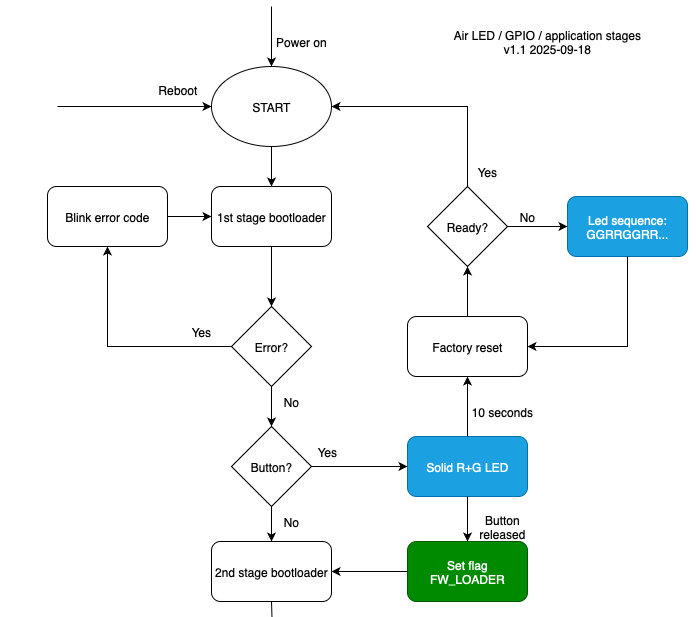
The flowchart of operation is below, legend:
White: Ready, Green: Being tested, Blue: TODO. As of Air fw v0.1.5
The first stage bootloader executes quickly, the button has to be pressed at powerup or reboot for the button to be registered. To run a factory reset, press the button for at least 10 seconds until bottom leds start alternating green-led blink sequence.
To enter firmware loader for uploading firmware, release the button before 10 seconds have passed.
Source code is available at